Lesson 21: Game Art Overview
In Lessons 1–20, you learned to draw and make simple attack animations. But "can draw" doesn't yet mean "can ship a game."
Art in games isn't just about looking good — it has to help players understand what they're seeing and play smoothly. From this lesson on, we place pixel art in the context of real game art.
1. What Is Game Art
Game Art = all visual content in a game. It helps players understand the world, read state, and make decisions.
Common categories:
| Category | Content | Purpose |
|---|---|---|
| Character Art | Player, NPCs, enemies, bosses | Recognize "who I am / who the enemy is" |
| Environment Art | Backgrounds, maps, levels | World-building, mood, where you can walk |
| UI Art | Menus, buttons, health bars, minimaps | Read info, tap controls |
| VFX Art | Skills, hits, environmental particles | Feedback, rhythm |
| Animation | Character actions, cutscenes, UI motion | Bring things to life, feel responsive |
| Concept Design | Early style exploration | Set direction, align the team |
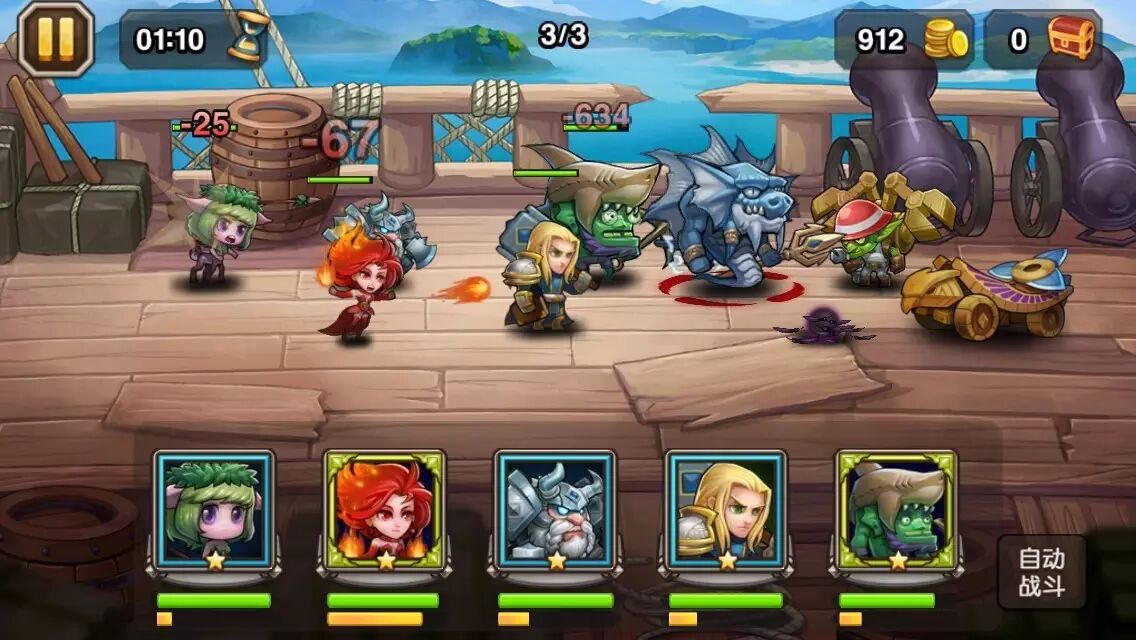
A combat screen like the one above — characters, environment, floating damage numbers, bottom portrait bar, auto-battle button — all counts as game art. The pixel characters and animations you've been practicing mainly fall under "character + animation"; later lessons will gradually cover environments, UI, and VFX.
2. Game Art vs. Fine Art
In one sentence:
- Fine art: Express yourself; the audience takes their time looking.
- Game art: Serve gameplay; players look while they play.
Two practical differences:
Poses must be readable. In illustration, you can pose however you like as long as it looks good. In games, you need to tell at a glance: standing (Idle), walking (Walk), getting hit (Hurt). The three-part attack from the last lesson — wind-up, strike, recovery — is practice for exactly this kind of "readable state."
The image must serve controls. A landscape illustration can pile on detail. A game scene has to let players tell in a fraction of a second: where's the path, where are enemies, where are items.
One hard rule for readability: color contrast — the environment supports the character so players can easily find who they're controlling.
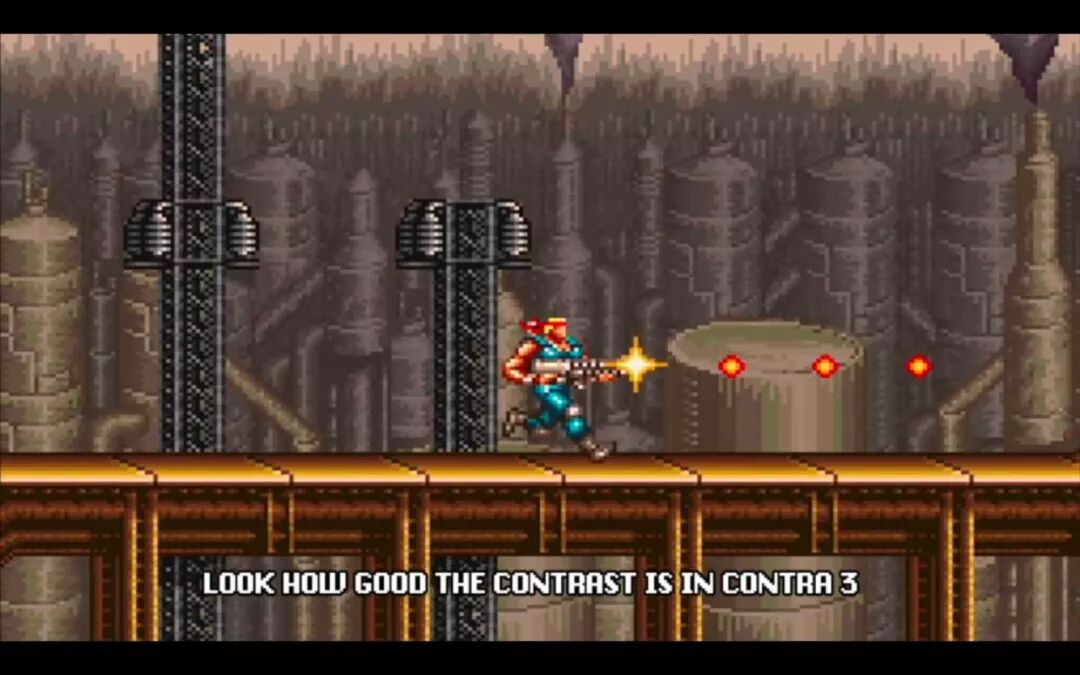
In games like Contra III, no matter how busy the background gets, the protagonist's clothes and muzzle flash still "pop." Players aren't admiring an illustration — they're dodging bullets and firing — contrast exists to serve gameplay.
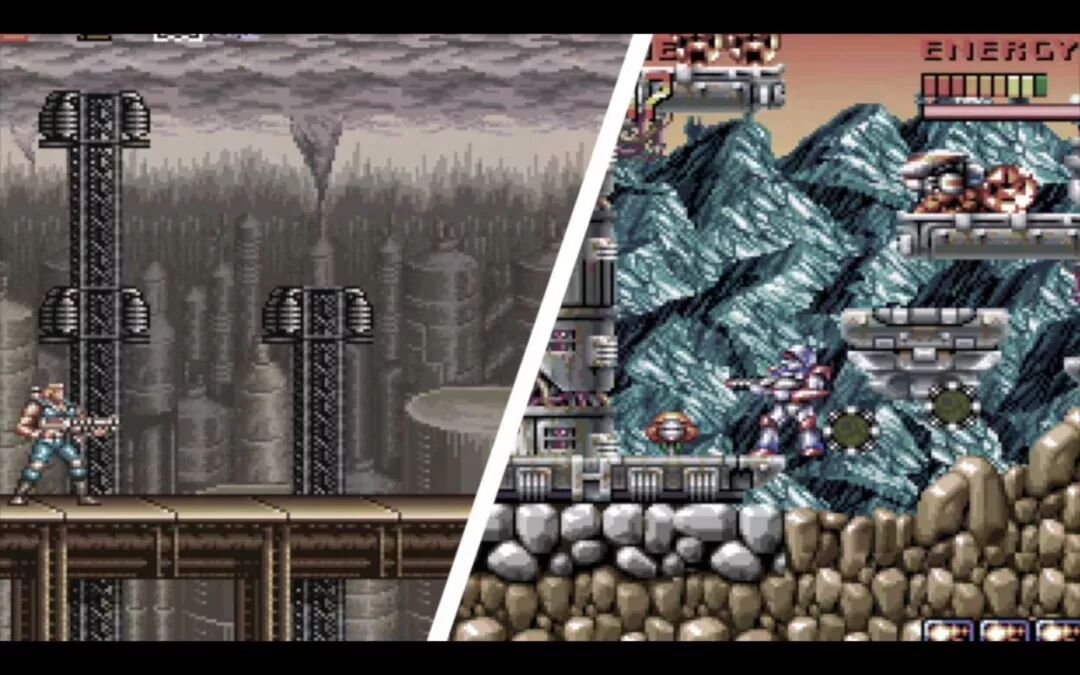
Look at this side-by-side: one side crushed into gray-brown tones, the other using full color to separate characters, enemies, and health bars. Both can work — the key is whether you deliberately designed "who should be seen."
When making game art, keep asking yourself:
When the player panics, can they still spot themselves instantly?
3. What Game Artists Do
Scale changes the job:
Solo indie dev
- You might handle characters, environments, UI, animation, and VFX
- Upside: unified style
- Challenge: limited time, must prioritize (side-scroller first, make it playable, then polish)
Small team (2–5 people)
- Common split: one leans character, one leans environment / UI
- Style alignment matters — otherwise pieces won't feel like the same game
Mid-size and up
- Concept, character, environment, animation, UI, TA (technical art) may be separate roles
- An art director sets direction; pipelines and reviews are stricter
- You deliver not just "a pretty image" but specs, naming, and iteration versions
Knowing the division of labor is enough for now. When you work on your own small project later, plan as if you're "doing everything yourself."
4. Beyond Drawing, You Also Need These
Beyond drawing technique, game artists also use:
-
Design thinking
Before you draw, think clearly: what does this do in gameplay? What info does it give the player?
For example, Mario's red cap, big nose, and overalls — not drawn randomly to look cool, but so the silhouette and colors read as "Mario" instantly at low resolution. -
A bit of technical understanding
How engines slice sprites, how scaling works, which filters blur pixels — later lessons will cover this. Know the limits so you don't draw for hours only to find it won't work in-game. -
Accept feedback and iterate fast
Game art almost always gets iterated: pivot changes, contrast tweaks, one animation frame at a time. Iterating fast matters more than getting it "perfect" on the first pass.
5. How Your Existing Foundation Connects to Games
The first 20 lessons were already building game-art fundamentals:
- Precise pixel control → readable at small sizes
- Limited palettes → colors aren't wasted, contrast is easier
- 1bit / value / color → visual hierarchy
- Attack animation → state and feedback
When connecting to a game, think in this order:
- Ask first: genre? camera? style? character personality?
- Find references, sketch thumbnails
- Lock the design (solo: enough views to work; teams emphasize orthographic views)
- Then draw pixels and animate
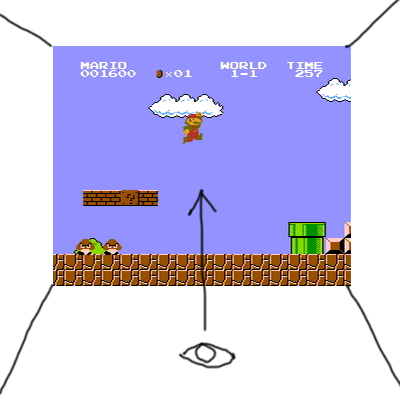
Side view is the easiest entry for beginners: draw mostly in profile, relatively small asset count, the eye "looks level at the screen" — it fits well with the side attack you've been practicing. Top-down, 45° isometric, and eight-direction work cost more — learn those when you need them.
How to pick resolution and integer scaling is covered in Lesson 25. For now, remember: resolution is the artist's canvas, not the player's physical screen pixels.
6. Homework
Pick your favorite pixel game (or a strongly pixel-styled 2D game) and write a short analysis (about half a page):
- What does the style look like? (palette, resolution feel, cute / dark / retro…)
- Where does it serve gameplay? (e.g., is protagonist contrast strong enough, are enemy wind-ups clear, does UI block the action)
- What's the single best thing it does? (silhouette, animation, scene layering, VFX… pick one and explain)
Optional: screenshot one frame and circle where the player's eye should land first.
Next lesson we focus on: what art style should your game have.
课程作者:像素熊老师
微信公众号「教你画像素画」 · B站 · X / Twitter · GitHub