Lesson 28: Game VFX Basics
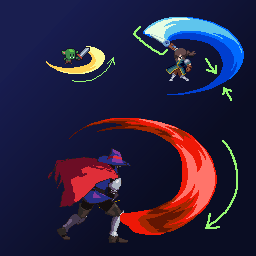
Last lesson, UI told you "how much health is left"; this lesson, VFX tells you "did that hit land?"
A game can run without VFX, but if there's no spark on impact, no dust on landing, no flash on explosion — the feel is like swinging a cardboard sword at someone. In pixel games, hand-drawn sprite sequences are the most common approach: enough control over style, and more performance-friendly than scattering particles everywhere.
1. VFX Generally Does Four Things
| Type | Purpose | Examples |
|---|---|---|
| Combat | Hit confirmation, skill release | Sword trails, sparks, break smoke |
| Environment | Atmosphere, ongoing states | Fire, rain, fog, candle flames |
| UI | Feedback, guidance | Item pickup pop-ups, button flashes |
| Status | Buff / Debuff | Poison smoke, shield rings |
On the implementation side, there are three common paths:
- Sprite sequences — draw frame by frame, then play them back (the main approach in this pixel art lesson)
- Particles — lots of small images drifting; count must be tightly managed, or the pixel look gets muddy
- Screen effects — screen shake, flash white, color grading; cheap and effective, but don't overuse and block the view
2. How a Sprite Sequence "Happens"
Think through what it's saying before you start drawing.
Common rhythm:
| Phase | What it does | Duration feel |
|---|---|---|
| Flash / Start | White core, strongest contrast | Very short, 1–2 frames |
| Main body | Largest shape, brightest colors | Brief |
| Dissolve | Shatter, smoke, fade out | Can be slightly longer |
For impact effects: brighten fast, fade fast. For looping effects (fire, smoke): short looping sequence, slight shape jitter is enough.
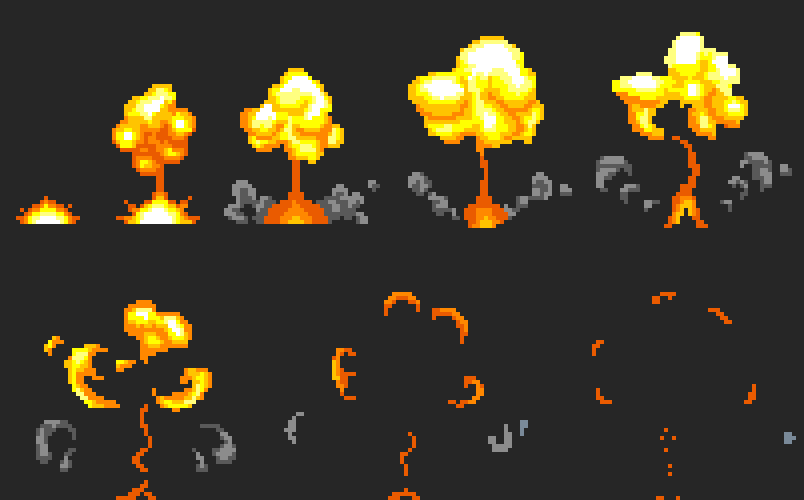
Look at this explosion: a small ground spark first → swells into a mushroom shape → tears open → scatters into fragments → only a few pixels remain. Don't draw a complete fireball from frame one — it'll look like a balloon in slow motion.
3. Fire: Hot Core + Flicker
Fire needs to feel "alive, rising upward":
- Core is brightest (white / yellow)
- Outer ring leans orange-red
- Top edge is jagged, drifts upward, occasional sparks breaking off
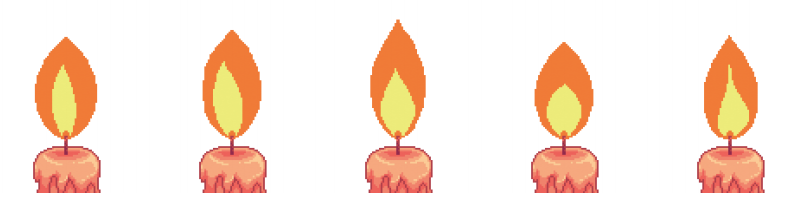
Environmental small flames are more common: candles, campfires use a 4–8 frame loop — base stays still, flame changes shape, and that's enough. Players will read it as "burning"; you don't need to redraw the candle every frame.
Big fireballs and sprays work the same way: first check whether the silhouette reads as "shooting upward," then refine the colors.
4. Hit Feel: Make "It Connected" Visible
A character finishing a swing isn't enough. The hit moment needs one clear frame:

The star flash / impact core on the left: white center + yellow halo + a few sparks, placed on the attack frame; the right side spreads slightly, like an aftershock.
Add a little "time frozen" and it hits harder:
| Companion effect | Usage |
|---|---|
| Hit Stop | Freeze 2–8 frames (light hits short, heavy hits long) |
| Screen shake | Slight camera shake; don't shake until it's nauseating |
| Flash white / red | 1–2 frames; don't block reading the move |
| Knockback / blink | Give the victim a visible reaction |
The sword arc in the opening image works the same way: the color bars aren't decoration — they're a visualization of trajectory and timing. Light, heavy, and spinning attacks should have different arc length and thickness.
5. How Shapes Grow and Dissolve
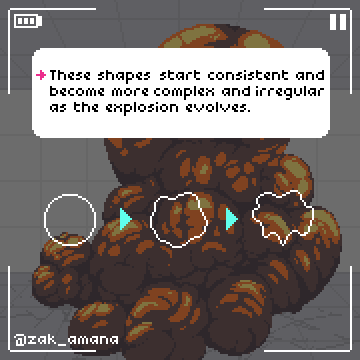
Explosions and smoke shouldn't start as "a blob of random noise." Shapes usually go: simple circle → slight jitter → tear into irregular forms. In games, dissipation is faster than in real life — real life is too slow and makes controls feel sluggish.
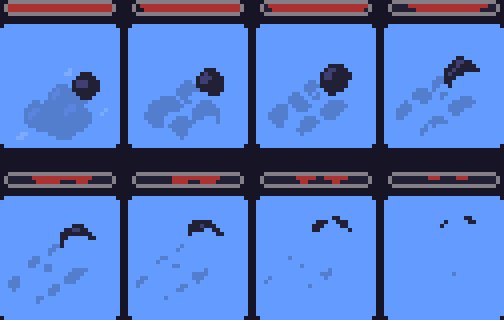
Continuous smoke / projectile trails work the same way: form a solid mass first, then break into scattered pixels. Don't make the whole thing a gray translucent blob — players still need to see where the character is.
Three common pitfalls:
- Too many particles → prioritize sprite sequences, or limit simultaneous count
- VFX covers the whole scene → control transparency; don't block the character's center
- Each effect drawn in its own style → keep palette, line weight, and detail density consistent with the whole project (see Lesson 22 Style Guide)
6. Homework
Make a hit effect that can plug into an attack:
- One-page design doc: name (e.g. "Short Sword Hit"), purpose, palette (3–5 colors), keyframe sketches (start / peak / dissolve)
- Sprite sequence: at least 6 frames, recommended 32×32 or 64×64, transparent background; include flash core → main body → dissolve
- Engine or preview: overlay on the character's swing frame; try different FPS, screenshot the one that feels most powerful
- Optional: recolor the same set for two elements (fire / ice), or add slight screen shake / Hit Stop and compare the feel
Next lesson embeds these flashes into attack and hurt animations themselves — how the VFX layer and action layer align together determines "game feel."
课程作者:像素熊老师
微信公众号「教你画像素画」 · B站 · X / Twitter · GitHub