Lesson 1: Pixel Art Background Knowledge and Software
1. What is Pixel Art
Pixel Art (ドット絵 / Dotto-e in Japanese) is a form of digital art where artists create by precisely controlling the position and color of each individual pixel.

Author: Pixel Bear
Pixel art is closely related to video game graphics from the 80s and 90s, where game artists created various visual effects under limited memory and low resolution. Today, although realistic 3D graphics are achievable, pixel art remains popular in games as an art form.
Why?
Because beyond nostalgia, creating under strict limitations is a fun and meaningful challenge.
Compared to painting or 3D modeling, the barrier to entry for pixel art is relatively lower. This makes it a preferred choice for indie game developers, but this by no means implies that developing games with it is easy.
Reaching a professional level in pixel art is very time-consuming, with few shortcuts. For 3D models, you can rotate, deform, move, and copy animations from one model to another.
Pixel art almost always requires a great deal of manual drawing labor on every single frame.
If you can grasp the rules and principles of pixel art, you can master it in a relatively short time (3-6 months).
2. Pixel Art Software
The basic tools needed for pixel art: zoom, pencil, line/shape tools, selection/move tools, and paint bucket.
You can use any drawing software that includes these features to create pixel art.
Most popular pixel art software in 2026.
| Need | Recommended Tool | Reason |
|---|---|---|
| Want Aseprite but don't want to pay | LibreSprite | Free fork of Aseprite |
| Best free all-around editor | Pixelorama | Godot-based, open source, supports layers/animation/tilemaps |
| Zero setup, open and use | Piskel | Open in browser, start drawing in 5 seconds, great for prototyping and game jams |
| Have $20 and want the best | Aseprite | Industry standard |
2.1 Pixelorama (Free)
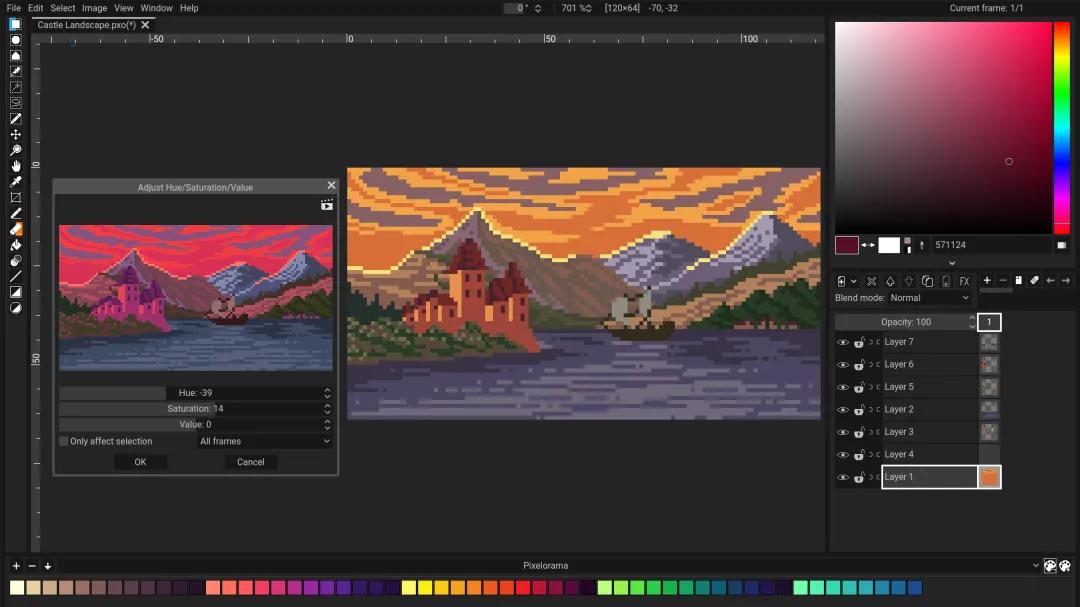
Pixelorama is developed with the Godot engine, open source, and has a 98% positive rating on Steam.
Download: https://pixelorama.org/#download
The feature list is so long it doesn't look like free software: layers, onion skinning, rectangle/isometric/hexagonal tilemaps, non-destructive effects (like drop shadows and gradient maps). The browser version means it can also run on Chromebooks or school computers.
Browser version: https://orama-interactive.itch.io/pixelorama
Best for: Those with zero budget and simple needs.
2.2 LibreSprite
LibreSprite is a fork of Aseprite from when it was still open source.
Download: https://libresprite.github.io/#!/downloads
If you've watched any Aseprite tutorial videos, the shortcuts and interface layout in LibreSprite are almost identical. In other words, the learning curve is practically zero.
But the problem is also this: after the fork, Aseprite continued to update with features like tilemaps, reference images, slicing, better tablet support, etc., none of which LibreSprite has kept up with.
If you're just drawing simple characters and animations, it's perfectly adequate; once complex projects are involved, the gap becomes apparent.
Best for: Those with zero budget, simple needs, and who don't want to learn a new interface.
2.3 Piskel
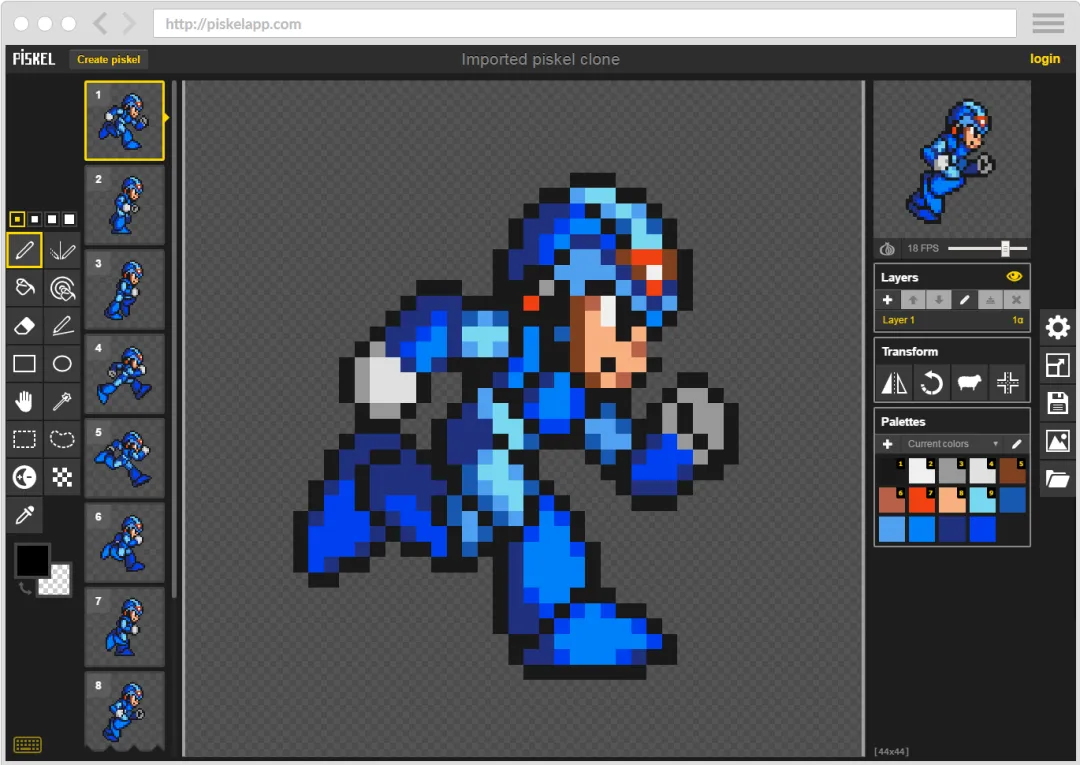
Open your browser, type https://www.piskelapp.com/ , and start drawing.
The whole process takes no more than 5 seconds. That's the speed of Piskel.
Its features are pitifully bare: no layers, no pressure sensitivity, the toolbar can be seen at a glance. But every time I participate in a game jam, it's always the first thing I open. 48 hours to make a game, "zero config, draw immediately" is a hundred times more important than "powerful but complex setup," I know this from experience.
Best for: Those who need rapid prototyping, casual doodling, and game jam participants.
2.4 Aseprite
Aseprite is currently the most popular paid pixel art software.
Supports Windows, Mac, and Linux. Most importantly, it is open source, so if you compile from source, you can use it for free.
Video Tutorials:
- Aseprite Pixel Art Professional Software Basic Tutorial
- Aseprite Pixel Art Professional Software Zero-Basics Video Tutorial
3. Pixel Art Learning Auxiliary Tools
image2Pixel is an image-to-pixel-art tool developed by Pixel Bear. Open it in your browser and use it immediately, completely free.
Its core function is to help you convert any image into a reference image at the pixel-size level, complete with grid lines.
It is especially useful for the pixel art "dual-reference drawing method": drop the photo of the object you want to draw into it, set the target size, and you can immediately get a pixelated preview with a grid to use as a reference base when drawing pixel art.
Best for: Those who need reference images to assist in drawing and want to practice the dual-reference drawing method.
Steam Full Version: image2Pixel
I love sci-fi movies. One that I rewatch often is the 1999 film The Matrix.
Do you remember that classic scene?
Neo stands between two mirrors, looking at himself.
Suddenly, the surface of the mirror begins to ripple like water, and then—the entire reality shatters into a green digital waterfall, with 0s and 1s falling like rain.
At that moment, Neo truly "sees" the underlying structure of the world for the first time.
Not smooth photos, not blurry filters.
It is individual pixels, arranged and combined, forming everything we see.
Drawing pixel art is essentially that moment Neo saw.
You take an ordinary photo—maybe your cat, your game character, a landscape you shot while traveling.
In the eyes of ordinary people, it's just a photo.
But in the eyes of a pixel art creator, it is a pile of pixels that can be disassembled, reorganized, and given a brand new life.
The problem is: most people don't have Neo's "x-ray vision."
They want to turn a photo into pixel art, so they fill it in grid by grid manually. Staring at the screen for hours, eyes sore, only to find the proportions are wrong and they have to start all over.
Or, they open some filter app and click "pixelate"—what comes out is blurry, jagged, and soulless. That is not pixel art; that is the corpse of pixel art.
The pixel art converter is your "Matrix mirror."
You drag any image into it, and in 3 seconds, what you see is not just a "blurred" image.
You see a true pixel grid—clean, controllable, editable.
Every pixel has meaning. You can zoom in, modify, replace colors, and adjust details.
It preserves the structure of the image while reducing it to the purest pixel language.
Just like the first time Neo saw the digital waterfall—you finally "see" it.
If you are a pixel art beginner:
You no longer need to spend months learning basic techniques before you can start creating.
Import your favorite image, convert it with one click, and immediately get a pixel art draft that you can study, modify, and refine.
You are not saving a few hours, but the months between "wanting to draw" and "drawing your first piece."
If you are a pixel art expert:
You no longer need to spend time on repetitive draft setup.
Toss your hand-drawn draft in, and in 3 seconds get a basic pixel framework. You focus your energy on what truly creates value—details, style, and creativity.
Time = money. You know this better than I do.
4. Pixel Art Accessories
Wacom drawing tablet CTL672 or an upgraded version, priced around 725 CNY.
I strongly recommend using a drawing tablet for any type of digital art to prevent wrist injuries.
If your wrist starts to hurt, it's already too late.
Therefore, start taking care of your wrists as early as possible—it's worth it!
5. Homework
Download and install your preferred software, and try it out.
课程作者:像素熊老师
微信公众号「教你画像素画」 · B站 · X / Twitter · GitHub