Lesson 13: Reverse Thinking in Pixel Art
1. Why Pixel Art Can Be Reversed
Pixel artists create meaningful images by manually placing pixel squares of different colors.
Due to the nature of pixel art itself, there are no hidden brushes or subtle gradient colors. Anyone can clearly see the position and color of every single pixel square in a pixel art piece.
Light and shadow colors are all shapes.
Every additional color (or level of light and shadow) in pixel art adds a corresponding shape. In other words, the more colors there are, the more shapes there are, and the more complex the pixel art becomes.

Super Mario, 16x16 pixels, 3 colors
The number of colors and the size of the pixel art piece are both fundamental factors that determine the complexity of pixel art.

Super Mario, 24x24 pixels, 16 colors
For you, a beginner in pixel art, you should start practicing with small sizes (24x24 pixels) and fewer colors (within 16 colors).
Only by doing so can you get through the novice phase in the shortest possible time.
2. Reverse-Engineering Pixel Art
The fastest way for a novice programmer to learn programming is to reverse-engineer existing software and read the source code.
Pixel art can also be reverse-engineered, turning complex pixel art back into simple pixel art.

By removing light and shadow and reducing colors, you can reduce complex pixel art to its simplest form.
Through reverse-engineering, you can gain a deeper understanding of light and shadow techniques (understanding why light and shadow are drawn this way), better grasp the relationship between shape, color, and light/shadow, and become more proficient in both shape and light/shadow techniques, laying a solid foundation for more complex pixel art in the future.
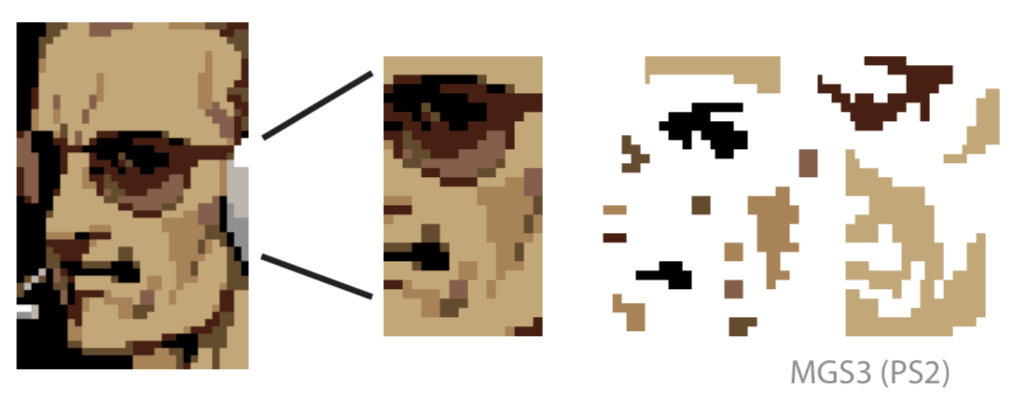
Complex pixel art has larger dimensions, more colors, and more details.
3. Homework
Choose a pixel art piece you like and reverse-engineer it.
课程作者:像素熊老师
微信公众号「教你画像素画」 · B站 · X / Twitter · GitHub