Lesson 3: 1-bit Pixel Art
1. What is 1-bit Pixel Art
1-bit pixel art has only 2 colors, most commonly black + white.
One color draws the positive shape (usually the subject you want to draw), and one color draws the negative shape (usually representing the blank space in the image).
You can also use other colors to replace black and white. But other colors can be a bit harsh on the eyes; the safest color scheme is black and white.
However, you can play some small tricks.
For example, adding other color tendencies into the black, so that players see it as black and white at first glance, but there is actually a color tendency.
1-bit pixel art only has 2 colors, not limited to black and white. The artist mainly uses shapes to create the image. Because even a line in 1-bit pixel art needs to be seen as a plane.
After all, even a 1-pixel line has thickness, and the thickness is 1 pixel.
So, in the extreme sense, pixel art is all shapes; there are no lines in the pure sense.
1-bit pixel art is very suitable for you to get started with pixel art, and you can quickly get positive feedback. For example, drawing a Batman logo with only black can be very rewarding!
But don't be arrogant and overconfident, because pixel art is very profound, and the time required to delve into it is truly a bottomless pit. As long as you master the rules and methods of learning pixel art, getting started is really fast.

1-bit is not only suitable for drawing icons and logos; drawing game characters is also possible. For example, the little dinosaur above is the protagonist of the side-scrolling mini-game after Google's 404 page—the dinosaur.
1-bit pixel art can also be used to develop console games. For example, the indie game "Baba Is You" above was released on the Nintendo Switch in 2019.
2. Dithering: Mixing Black and White to Create Gray
Although there are only 2 colors, you can mix black and white to create gray.
This is the principle of the pixel art technique called dithering. (It actually utilizes the visual compensation mechanism of the human eye; the human eye and brain will mix adjacent black and white pixels into gray.)
Different dot patterns have already been summarized by predecessors. You just need to use them directly. The latest version of Aseprite already has built-in dot patterns.
This is called halftone technology in the printing field; it is through the checkerboard grid of ink dots that printers achieve various levels of gray.
In comics, it is screen tone; different screen tones are different grays.
In addition to simple dot patterns, you can also create special textures according to the needs of the theme.
3. Black and White Inversion
1-bit pixel art can have 2 forms of expression: with black as the background or with white as the background.
The effects drawn by the two methods are different.
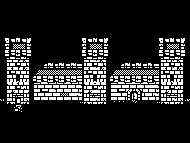
A white background is more suitable for bright and conventional themes, while a black background is suitable for dark, fearful, and punk-style themes.
4. How to Quickly Master 1-bit?
First of all, drawing requires some visual thinking and imagination. Simply put, you need to have pictures and images in your mind.
What if you don't?
If you don't, you need to pay more attention and observe more in daily life, deliberately look at various patterns, graphics, and excellent works (not limited to albums, pictures, games, anime, movies...)
The more things you have seen, the more images and scenes remain in your mind and memory. These things left in your mind can all become material and sources of inspiration for future creations.
1. You can start by drawing this small pixel flower below

Author: Richard Grillotti
This flower is composed of 8 pixels and has 3 colors. Anyone should be able to draw this flower without any pressure.
2. Then draw this larger pixel flower

Author: Richard Grillotti
You can draw this larger pixel flower in whatever order and steps feel comfortable to you.
3. Now you can use the methods you have learned to draw more plants (fruits)
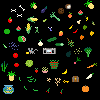
Author: Richard Grillotti
Don't be afraid, draw boldly, and remember to use as few pixels as possible.
4. Next, you can try drawing insects and animals
You don't need to deliberately learn sketching or offline drawing classes; this is almost useless for pixel art learning, because these are two completely different types of painting.
The specific method is as follows: you can find a picture of the theme you want to draw, for example, a dinosaur, and then find a picture of a dinosaur.
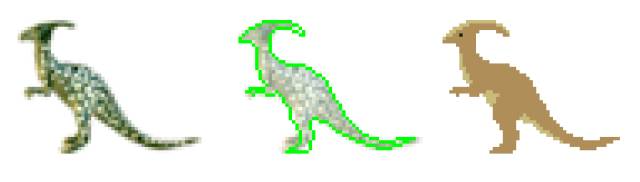
Author: Richard Grillotti
Shrink the dinosaur picture, trace the shape, and fill it with your favorite color.
Below is the dynamic step-by-step process; it's that simple, the dinosaur is drawn. Of course, the final effect of 1-bit pixel art depends on your personal aesthetic, depth of understanding of pixel art, and artistic cultivation.
5. Try Different Drawing Methods and Styles
Even 1-bit pixel art has many different drawing methods and styles. Generally speaking, as the size increases, the more style variations there are.
Taking the bee as an example, there can be at least 5 different drawing methods.
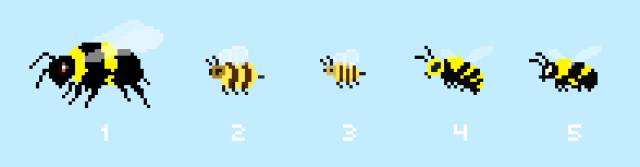
Author: Richard Grillotti
1-bit pixel art is mainly based on shapes; as long as you learn to draw pixel art shapes, you can create 1-bit pixel art.
The shortcomings of lacking a foundation in drawing and skills can be compensated for by reference images and materials.
6. Homework
Complete a 1-bit pixel art shape exercise.
After completion, post your work to the community, and the teacher will review or correct it.
课程作者:像素熊老师
微信公众号「教你画像素画」 · B站 · X / Twitter · GitHub