Lesson 9: AA Manual Anti-Aliasing Technique
1. Anti-Aliasing
AA, short for anti-aliasing, means smoothing jagged edges. Pixel artists need to control the position and color of every pixel, so anti-aliasing must also be done manually. Anti-aliasing generated by software algorithms is prohibited in pixel art.
The earliest FC (Famicom) game pixel art had no AA, because there weren't enough colors. Adding AA means adding colors. In SFC (Super Famicom) games, it is easier to find traces of AA being used. With the increase in color count on 16-bit consoles, game art quality improved dramatically.
The prerequisite for skillfully using AA is mastering light and shadow techniques.
2. AA Principles
The principle of AA is similar to dithering. It mainly relies on the human eye's color mixing. To some extent, AA can be understood as a level of light and shadow.
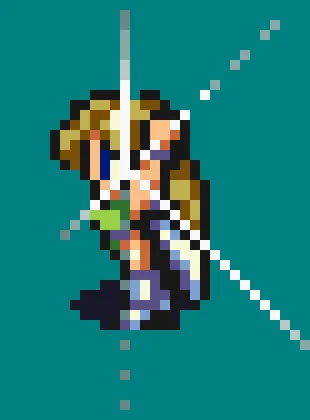
The image above is from the SFC version of Final Fantasy. When the heroine raises her sword, the special effect glow uses white and different shades of gray to show the decay of the light.
This is because light-colored pixels appear visually thinner, while dark-colored pixels appear visually thicker. So although they are all square pixels, they give the viewer a feeling of radiant light beams gradually disappearing at the ends.
AA achieves a visually smooth effect by adding transitional color pixels.

The character designs for the SFC version of Final Fantasy were done by Yoshitaka Amano, which are very beautiful and ethereal. To capture Amano's feeling in a 40x40 pixel space, it would probably be impossible without using AA.
The more realistic the pixel art, the more necessary AA becomes.
Note the character's eyes, which use AA.
2. Where Is AA Used?
Pixels are square, so when a pixel's color changes, a jagged feeling easily appears.
Therefore, AA is mainly used on outlines, edges, and wherever colors change.

The image above is the character art from SFC Bubble Bobble.
You can easily spot the AA, such as on the outline of the yellow horn, the eyebrows, and the outline of the face.
3. AA Usage Example
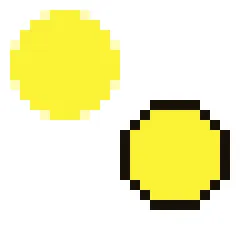
The same yellow circle, compared with and without AA. It is obvious that the yellow circle with AA looks smoother.
4. Homework
Use the methods learned today to add AA to a pixel art piece you have previously drawn. The result must look better, not worse or more blurry.
课程作者:像素熊老师
微信公众号「教你画像素画」 · B站 · X / Twitter · GitHub